
Using the App to build your branches

(note: you don’t need internet to record your trips)
Download Strava (apple, ios).
Set up your profile.
When you are ready to start your journey open the app and click ‘record’.

This will open the map and you should have a green banner at the top that says ‘GPS signal acquired’.
Click on the big orange start button.
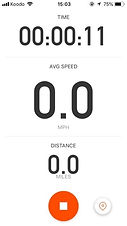
That will open a screen like this which shows speed/ time/ distance etc (not important).
You can close this page while you travel, just don’t close the app completely. It will record your journey.
When you have reached your destination click the orange stop icon on this page.
note: travel by metro will be represented as one straight line, and not the exact journey you made, don’t worry about this. You have options to choose a sport/ mode of transport. If yours isn't there (i.e. any public transport/ cars etc) just choose bike.

That will bring you to this page. Click finish. This will bring you to the next page where you can see your recorded trip.

Click ‘save activity’ and then you can close the app.
Your branch could be made up of one of these trips or several. If you have different stops between your Home (starting point) and your final destination, you can record these ‘in between’ journeys separately (so you don’t need to leave the app open all day).
Finished recording both trips?
Click here..